
Superbuy QC Photos: Turn Each Image into a Specific Check
Superbuy QC photos are most useful when you start with a question: is this the selected colour, does the label match the ordered size, or is a particular seam visible? An image set becomes less useful when a broad verdict such as “looks good” replaces those checks.
Open My Warehouse in your Superbuy account and choose the received item's record to look for its inspection photos. Match that record to your selected version before interpreting a picture. Superbuy's shopping-agent guide describes photography after warehouse arrival, so a seller's dispatch message and available warehouse photos are separate steps.
Match the photographs to the ordered option
Compare the item reference, selected version and quantity before judging details. A correct-looking product in the wrong size still fails the selection check. For a set, make a list of the pieces you ordered and compare that list with what is visible; props in a seller photograph are not automatically included accessories.
Keep the photograph date and item association in your private order notes. If an image appears to belong to another item, ask for clarification instead of transferring its observations to your own row.
Read the whole view, then inspect a detail
Start with overall shape, colour placement and included pieces. Next look at areas that matter for the product: seams and closures on clothing, paired details on shoes, or an accessory's attachment points.
Lighting and camera angle affect how a colour or shape appears. A shadow can resemble a stain, and perspective can make one side look larger. If the issue depends on that distinction, ask for another view under comparable conditions rather than treating the first impression as proof.
For an illustrative footwear check, you can open this Superbuy product reference to identify details you would want to compare. Its listing picture is not a warehouse QC photograph and does not show an item from your order. Product options must load before you can use them to identify a selected version.
Request the missing view, not a general reassurance
For context when budgeting an extra view, the 1 October 2026 pricing capture displays US$0.33/PCS for Detailed Photo. The card’s description concerns a personalised high-definition detail; it does not establish a universal measurement service or response time. Check the applicable terms before submitting your request.
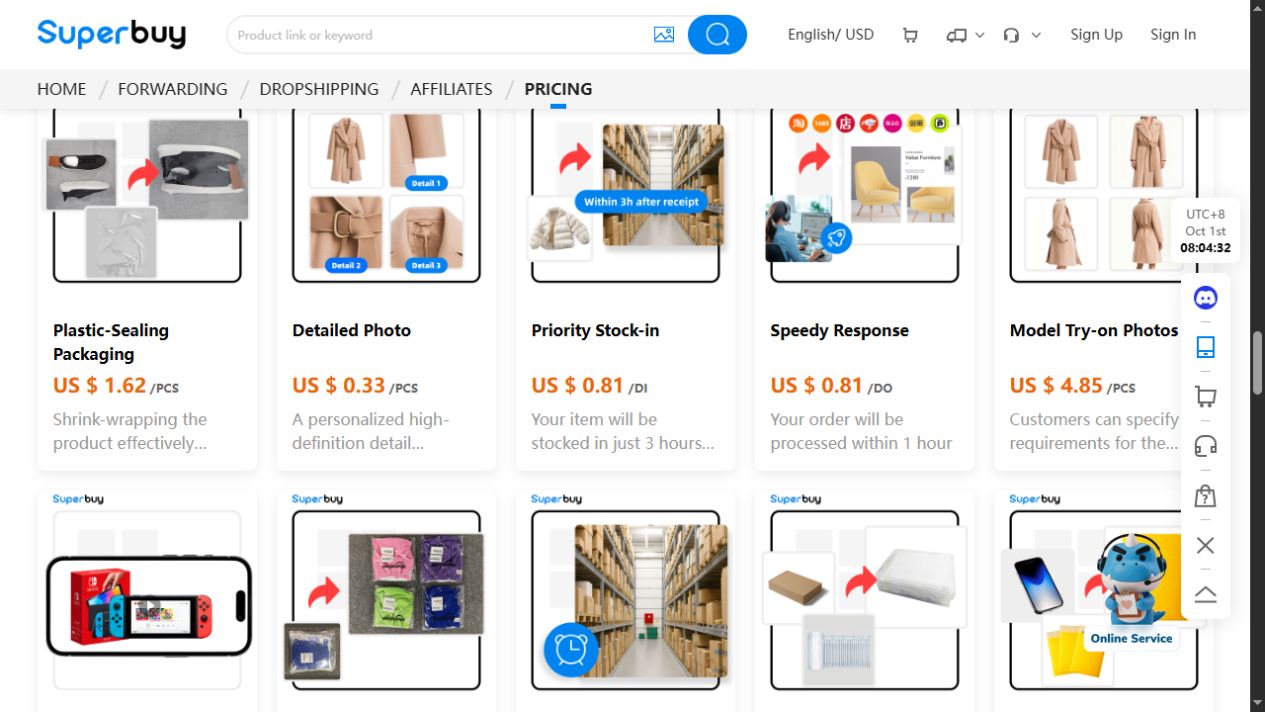
A focused request is easier to answer than “check quality.” Identify the precise feature and the image needed to inspect it. For example: “Please show the closure from above with both sides visible,” or “Please show the size label clearly for the selected item.”
If the question is measurement, specify the method and unit. A chest-width photograph should show where the tape starts and ends, with the garment laid out consistently. The size guide explains how to compare that with a garment you already wear.
Confirm the requested view, displayed charge and timing together. If you need a measurement rather than a close-up, name its start and end points so the response addresses the actual comparison.
Separate a finding from a conclusion
Useful notes state what is visible: “the label reads L,” “the left seam is obscured,” or “the ruler starts beyond zero.” They do not jump straight from one photograph to claims about authenticity, hidden materials, durability or future comfort.
In a hypothetical case, a dark mark appears beside a shoe's heel. Record the location and request a clearer angle. Do not label it permanent damage or dismiss it as a shadow without enough information. If the follow-up supports a visible problem, describe it precisely when asking about the next available action.
The returns guide helps you frame that enquiry. A photo request or return request does not establish that a remedy has been approved.
What a QC finder or viewer can tell you
People looking for a Superbuy QC finder, checker or viewer may be seeking photographs before buying. First establish what the tool actually displays: seller pictures, public images from someone else's order, or photographs associated with your own item.
A matching product address can help locate a reference, but compare its variant and image context before using it. For your own received item's condition, return to its My Warehouse record. If a finder displays only another buyer's images, use those to choose a question or angle, then request the corresponding view of your item.
For example, a UUFinds gallery view shows a dark button-front shirt laid out with its sleeves folded inward and a scale along the image border. The view makes the front buttons and chest embroidery visible, but does not show the back or a measuring tape spanning the chest. It suggests useful follow-up requests—a back view or a chest-width measurement—not a verified fit result. Treat this aggregated-gallery example separately from your Superbuy order and from the footwear listing above.
For discovery from an image, read the image-search guide. Finding a visually similar candidate and inspecting an ordered item are different tasks.
Share only what others need to inspect
Before posting an order image, remove names, addresses, account identifiers, order numbers and scannable labels that could expose private records. Check the background as well as the product. Keep an unaltered original privately if you need it for a support enquiry.
Use images you have permission to share. Removing a username does not by itself grant permission to reuse someone else's photograph. Keep any useful context, such as selected size and measurement method, without exposing identity.
Decide the next step
After reviewing the image set, either keep the selection, ask a precise follow-up, or enquire about a change. Keep unresolved questions visible in your personal notes before moving to parcel preparation.
For a broader assessment, the spreadsheet review guide separates the usefulness of a recommendation from what an actual order's pictures show. Keep the source, selected option and observation together in your own notes, and return to the Superbuy spreadsheet guides for the next comparison.